
Family calls & help texts
Call a trusted contact from a large tile, or prepare a help text with a location link when available and permitted. You start the call or message.
A small habit. A meaningful connection.
One tap says “I’m OK.” Senior Companion helps older adults living alone and the people who care about them stay connected, day by day.
Daily check-ins and family updates require a Family Monitoring subscription. Essential phone tools are free.
See how a daily check-in works
How it works
For you, an aging parent or someone you support. Set it up together, then make checking in part of the day.
Install Senior Companion on both phones. Choose the appropriate role and pair using the temporary code, with the other person’s permission.
Activate Family Monitoring and set up to three daily check-in times. Local reminders help bring you back to the large “I’m OK” button.
After a check-in syncs, your paired family member can see it. If a scheduled check-in is missed, optional automatic emails can notify a verified caregiver.
An offline check-in must sync before family can see it. A check-in records an action; it does not confirm someone’s health or safety.
For family & caregivers
Stay involved in everyday life, even when you don’t live nearby. Family Monitoring brings shared updates into one place.
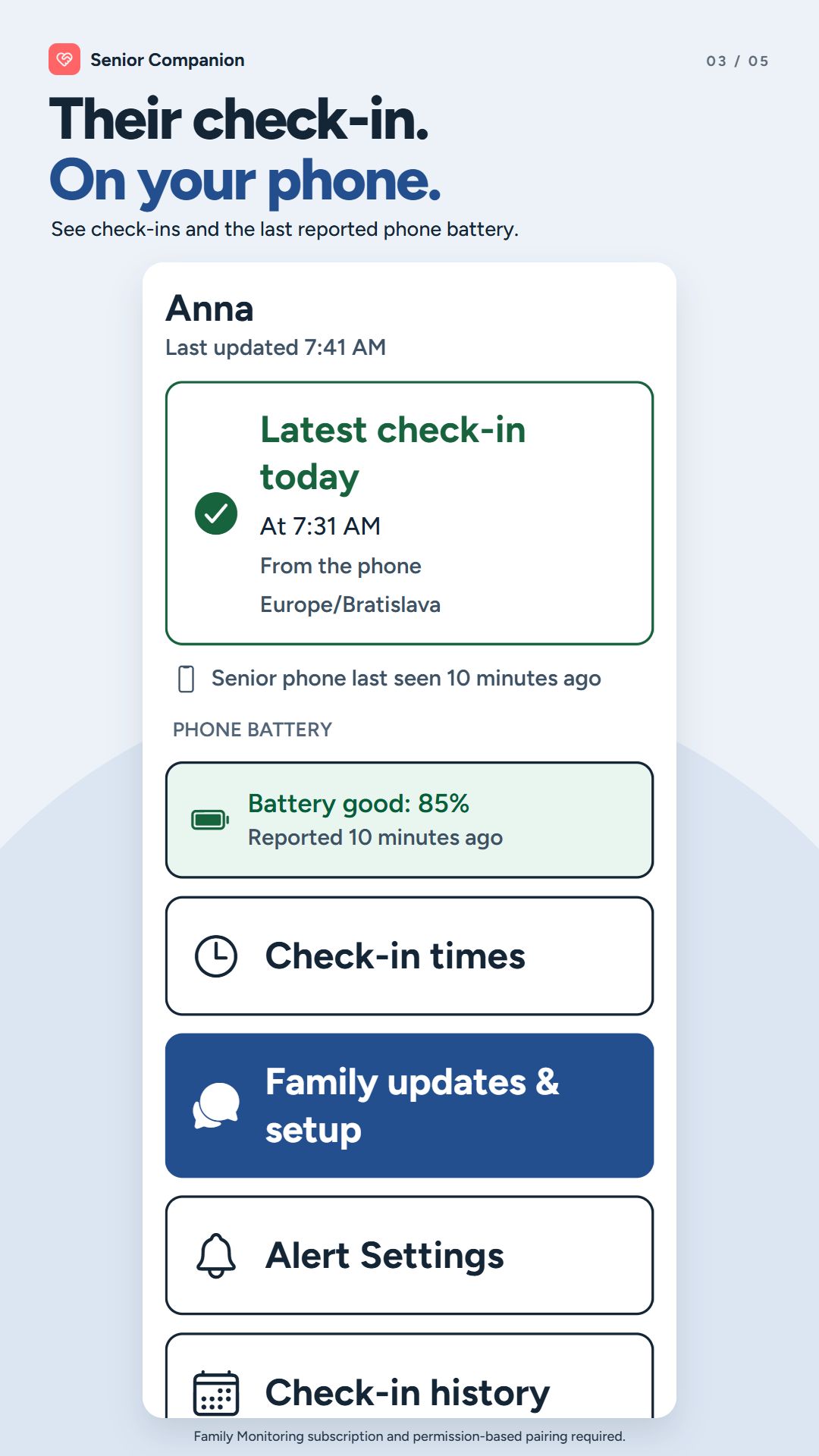
See received check-ins and when they arrived, so you can decide when to get in touch.
Enable automatic alerts for a verified caregiver email. A later check-in can send a resolved update. Up to 200 automatic alert emails are included per month.
View the phone’s most recently reported battery level and its update time. An old report is not a current reading.
Share messages, photos and care tasks, and help manage shared contacts, notes and check-in schedules.
Simple beyond the check-in
Large text, clear buttons and familiar actions make the phone easier to use. These essential tools are available without a subscription.
Call a trusted contact from a large tile, or prepare a help text with a location link when available and permitted. You start the call or message.
Use the camera to enlarge small print or turn on the flashlight without searching through a crowded home screen.
Keep useful information close at hand. On Android, optional Home Screen Mode also offers simpler access to everyday apps.
Additional contacts, contact photos, custom Quick Texts and home screen customization are free too. No one-time upgrade is needed in the latest version.
Choose what you need
Everyday phone tools and personalization are free. Add Family Monitoring for daily check-ins and connected caregiver services.
No purchase needed
A simpler, more personal phone.
Daily Check-In is not included.
Monthly or yearly subscription
For daily check-ins and shared family updates.
Current prices and billing periods appear in the app store before purchase. Family Monitoring renews automatically unless canceled through Google Play or your Apple Account. Check-ins and alerts depend on setup, connectivity and service availability.
Sharing stays a choice
Adding someone from your contact list does not give them access to check-ins. Family sharing requires separate setup and consent.
The app does not upload your full address book. If cloud sharing is enabled, selected contact details and other shared information are uploaded for your paired caregiver.
Disable cloud monitoring and request deletion of its data from the app. Location sharing is user-initiated, not a continuous location feed.
It is a way to record a simple “I’m OK” action at an agreed time. With Senior Companion’s Family Monitoring subscription, a paired family member can see received check-ins and optionally receive an email when a scheduled check-in is missed.
Older adults living alone, people who want a simple check-in routine, and family members or caregivers supporting someone’s independence. It is not a professional care service.
No. Daily Check-In, reminders and caregiver services require Family Monitoring, an auto-renewing monthly or yearly subscription. Everyday tools, including additional contacts, contact photos, custom Quick Texts and home screen customization, are free in the latest version. No one-time upgrade is needed.
If automatic alerts are enabled and the caregiver email is verified, a missed scheduled check-in can trigger an email. The family member decides how to follow up. Emails may be delayed or fail; a missed check-in does not establish that an emergency has occurred.
A check-in can be saved on the phone while offline, but it must sync before family can see it. A check-in that has not reached the server may still result in a missed-check-in email. The app distinguishes a local save from online confirmation.
Both phones need Senior Companion to use the paired family dashboard. Automatic alert emails are a separate, optional setup with a verified recipient. Simply selecting a person from Contacts does not connect their phone.
No. Senior Companion does not provide fall detection, a continuously watched monitoring service or automatic emergency dispatch. A check-in is not proof of health or safety. In an emergency, contact local emergency services directly.
Yes. Senior Companion is available on Google Play and the Apple App Store, with English, German and Ukrainian interfaces. Home Screen Mode is an optional Android feature; appearance and some phone tools differ by platform.
One tap. “I’m OK.”
Find Senior Companion on your app store and choose the setup that fits your family.
Daily check-ins and caregiver services require Family Monitoring.
No hardware purchase is needed to use the app.